LAB/05 — CARL

Built by Carl

Everything in the store by Carl.

Plugins are sold by independent developers, who handle their own refunds and support. Terms · Privacy

← ALL PRODUCTS
RUST PLUGIN

Death Redeem

Gives players the option to respawn at their death location using a configurable cost. Supports Scrap, Economics, ServerRewards, or custom items, with a full death-screen UI, a player-facing bank UI, and in-game admin controls. Features Death-screen card next to the respawn options — shows cost and your balance at a glance, colour-coded green when you can afford it and grey/red when you can't One-click redeem: pay and respawn near your death location instantly Player bank UI (/deathbank) — deposit and withdraw with buttons (+10 / +100 / +1000 / ALL), live balance, on-hand count, respawn cost, and a status line telling you exactly how much more you need for your next redeem Admin UI for changing settings in-game without touching the config Four payment modes: Scrap, Economics, ServerRewards, or a custom token item (any item + skin ID) Configurable redeem window, respawn offset distance, costs, colours, UI position, and command names VIP-friendly bypass permission for free respawns Safe respawn placement — finds clear ground near the death spot, never inside walls or foundations Permissions deathredeem.use Allows use of the death-screen redeem button and /drshow. deathredeem.bank Allows use of the bank system. Required for the /deathbank UI and the /bankd and /bankw commands. Also allows /drshow info output. deathredeem.admin Grants access to the Admin UI. Allows changing payment mode, cost, enabling/disabling the plugin, and toggling withdrawals. deathredeem.bypass Bypasses all costs and checks. Free respawn, ignores balance requirements. Chat Commands Command names are configurable — defaults shown below. /deathbank Permission: deathredeem.bank Opens the bank UI. Shows your bank balance, scrap/tokens on hand, and the current respawn cost, with deposit and withdraw buttons. Only used in Scrap or CustomItem modes. /bankd <amount> Permission: deathredeem.bank Deposits scrap or custom tokens into the DeathRedeem bank via chat. Only used in Scrap or CustomItem modes. /bankw <amount> Permission: deathredeem.bank Withdraws scrap or tokens from the bank via chat. Requires AllowWithdraw = true. /deathredeem Permission: deathredeem.admin Opens the DeathRedeem Admin UI. /drshow Permission: deathredeem.use, deathredeem.bank, or deathredeem.bypass Shows current mode, cost, and player balance. Payment Modes Scrap Economics ServerRewards Custom token item (configurable shortname, skin ID, and display name) Data Bank data saved to DeathRedeem_Bank.json Bank clears on wipe (configurable) Please open a ticket with the plugin name to purchase.

£24.99 · v1.1.0

PLUGIN PACK

Gambling Pack

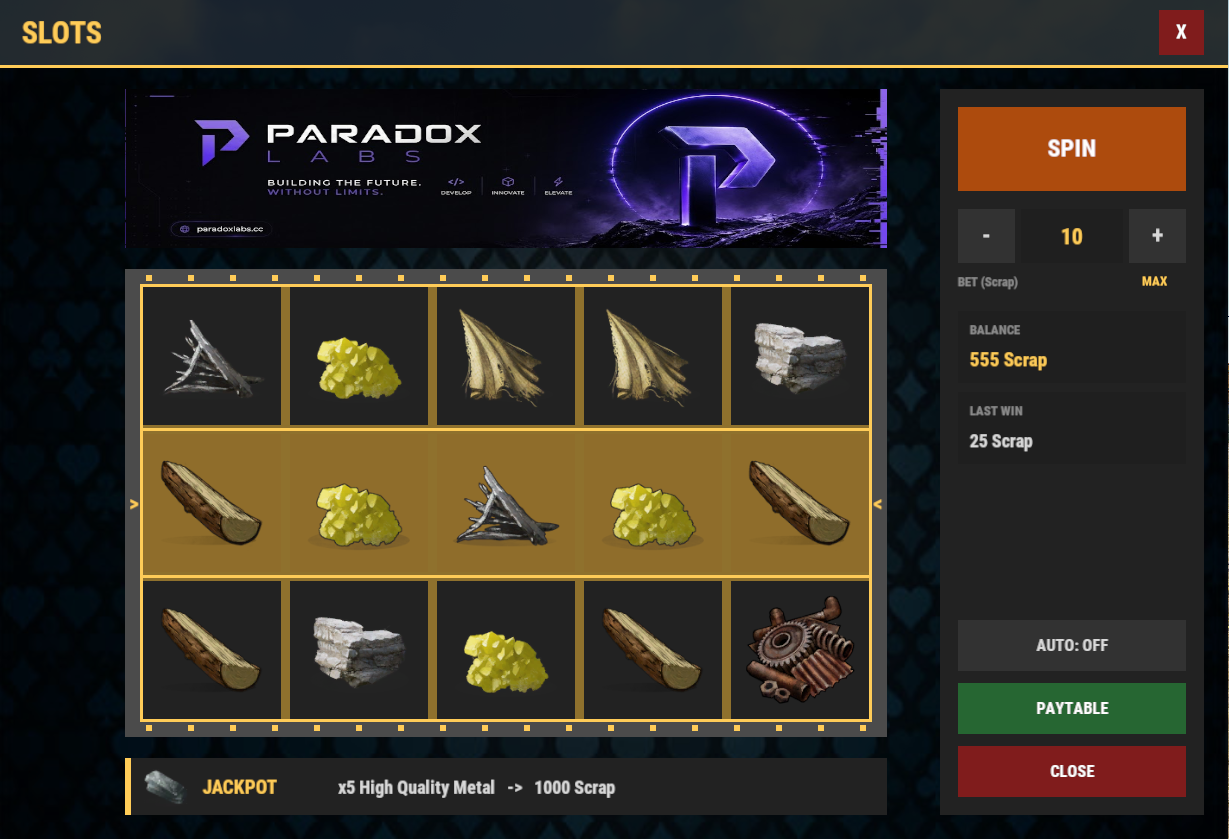
Turn your server's scrap into a casino. Three gambling plugins that share one currency, one look and one feel, so players learn them once and play all three. Every game takes bets in **Scrap**, **Economics** or **ServerRewards** — your pick. Every game is safe on disconnect: a player who logs out mid-hand, mid-flip or mid-spin loses nothing, and what they are owed is settled when they come back. **Blackjack** — A full table with animated dealing. Play the dealer with real rules (stands on 17, optional soft 17, multi-deck shoe, double down) or challenge another player head-to-head, closest to 21 takes the pot. `/bj` to open, `/bj top` for the leaderboard. **Coin Flip** — The fastest bet on the server. Flip against the house on a 50/50 with a house edge you set, or call out another player and let the coin decide who takes the pot. Cooldowns and daily limits keep it from getting out of hand. `/cf` to open, `/cf top` for the leaderboard. **Slot Machine** — A fully animated slot machine, 3 to 7 reels by 1 to 5 rows, with any Rust item as a symbol — skins included. Live paytable, bet controls, auto-spin, and a jackpot banner above the reels with its own sound when someone hits it. Bet in one currency and pay out in another if you want. `/slots` to open. ### Why the pack These three were built as one set. Same currency hooks, same permission pattern, same animated UI, same care on disconnect. Install all three and your server has a casino, not three plugins that happen to be about gambling. Every bet range, payout multiplier, table tax, cooldown and symbol is in the config. Run it tight or run it loose. Bought alone they are £29.97. The pack is £19.99. Each plugin is a separate file with its own config and its own updates.

£19.99 · 3 plugins

RUST PLUGIN

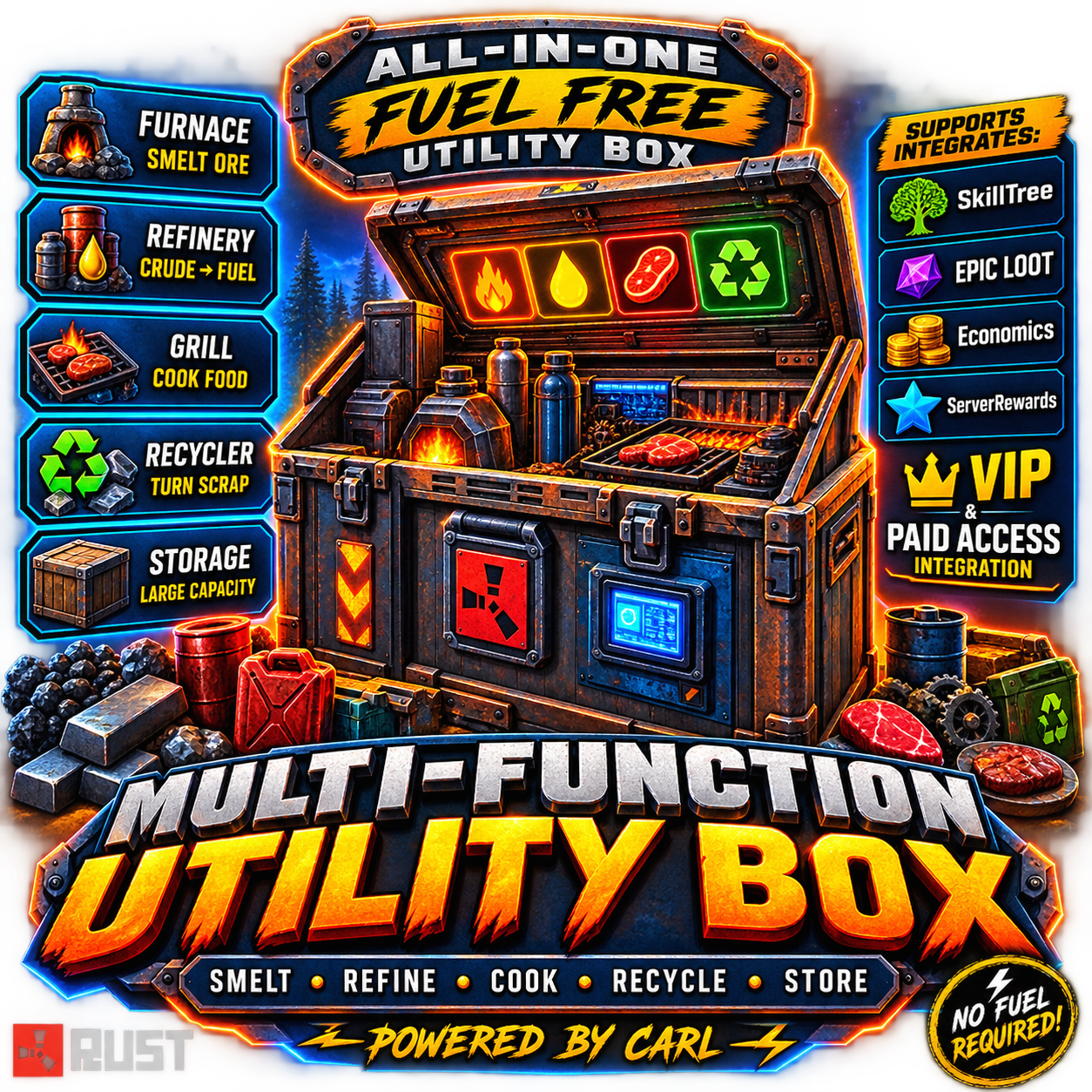
Multi Function Utility Box

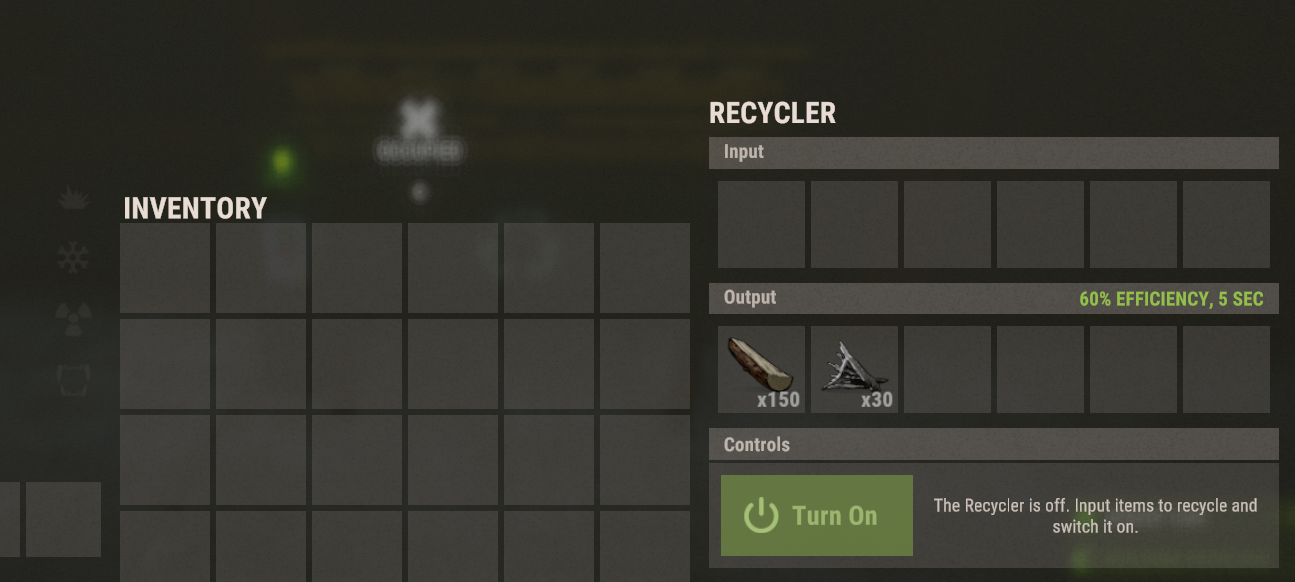
Turns a normal deployable box into an all-in-one passive processing station smelting, cooking, refining, and recycling all happen automatically inside the same box, no separate furnaces or recyclers needed. Give it out as a special reskinned item via command, and it only activates its processing when it recognizes its own skin. Features Reskins a configurable base deployable (default: large wooden box) with a workshop skin, recognized purely by name + skin ID Passively smelts ore, cooks food, refines crude oil, and recycles items — all inside the box on a set interval Recycling has a randomized yield range and a short exemption timer, so items can't be instantly re-recycled in a loop Fixed yields for non-craftable loot items (Gears, Tech Trash, etc.) SkillTree and Epic Loot integration for speed bonuses and bonus loot rolls Optional paid temporary access for non-VIP players (Scrap, Economics, ServerRewards, custom item, or resources) Shop-ready — mfbox.give is a console command, so it drops straight into any shop plugin for players to buy Admin diagnostic command to check why a container is/isn't recognized as a Utility Box Chat Commands /mfbox — (admin) give yourself a Utility Box /box — buy/activate temporary processing access (VIP with permanent access just gets a confirmation reply) /mfboxclear <name/steamid> — (admin) clear a player's temporary paid access Console Commands mfbox.give <name/steamid> — give a Utility Box to a player (wire this into your shop plugin's purchase command to sell it) mfbox.clearaccess <name/steamid> — clear temporary access via RCON/console mfbox.checkbox — (F1, looking at a container) diagnostic: shows prefab/skin match and tracking status Permissions multifunctionutilitybox.use — required for a box to actually process (permanent access) multifunctionutilitybox.give — required to use /mfbox and /mfboxclear

£19.99 · v1.0.0

RUST PLUGIN

Server Sell

Turns any dropped box into a fully functional sell terminal, plus a standalone sell overlay you can pull up from your own inventory or any storage box — no shop plugin required. Prices flex with dynamic, live market conditions if you want them to, or stay flat and predictable if you don't. Features Drag-and-drop sell terminal UI, with a separate quick-sell overlay for your own inventory or any container you're looking at Three currency backends — Scrap, Economics, or ServerRewards — with a configurable exchange rate (value points per 1 currency) Optional dynamic pricing engine — online player count, time of day, weekends, demand, bulk-sell thresholds, seller rep, and season multipliers can all nudge prices live Fraction banking — leftover currency under a whole unit is banked per-player and paid out once it rolls over DLC-item protection (blocks Facepunch TOS-restricted items by default, with manual overrides) and optional blocking of skinned gear Per-item blacklist and a "removed items" list so admin-deleted entries never get re-seeded Sale announcements above a configurable payout threshold Full in-game admin price editor — browse by category, search, page through items, and edit or bulk-reprice on the fly Chat Commands /sell — open the sell terminal /sellinv — quick-sell straight from your own inventory /sellbox — quick-sell from the storage box you're looking at /selladmin — open the admin price editor UI /sellprice <shortname> [value] — view or set a single item's price /sellrate <points per 1 currency> — view or set the currency exchange rate /sellreprice <value> [category] — bulk-set every item, or one category, to a flat price /sellbank — check your banked remainder and lifetime earnings Permissions serversell.use — required to sell (terminal, inventory, or box) serversell.admin — required for /selladmin, /sellprice, /sellrate, /sellreprice

£19.99 · v1.3.1

RUST PLUGIN

Black jack

Blackjack A full blackjack plugin for Rust (Oxide / uMod). Play against the dealer with real blackjack rules (double down, blackjack payout, configurable dealer stand), or go head-to-head against another player. Configurable currency, animated card table UI, sounds, leaderboard, and offline-safe payouts. Author: carl · Version: 1.0.0 --- Features VS Dealer — hit, stand, and double down against a dealer that plays by configurable rules (stands on 17, optional hit soft 17, multi-deck shoe). VS Player — challenge another online player head-to-head; closest to 21 wins the pot minus a configurable table tax, with a per-turn timer. Three currencies — Scrap (built in), Economics, or ServerRewards. Animated dealing, win/lose/push sounds, chat + on-screen messages. Per-player stats (wins/losses/pushes/blackjacks) and a `/bj top` leaderboard. Offline-safe: stakes and payouts owed to a disconnected player are refunded/settled, with scrap repaid on next login. --- Chat Commands Default command is `/blackjack` with the alias `/bj` (both configurable). Command Description `/blackjack` or `/bj` Open the blackjack table. `/bj accept` Accept a pending challenge from another player. `/bj decline` (or `/bj deny`) Decline a pending challenge. `/bj cancel` Cancel your outgoing challenge (refunds your stake). `/bj toggle` Turn player-vs-player challenges to you on or off. `/bj top` (or `/bj stats`) Show the profit leaderboard (top 10). `/bj help` List the commands. In-table buttons (DEAL, HIT, STAND, DOUBLE DOWN, SEND CHALLENGE, REMATCH, FORFEIT/LOBBY, bet controls) drive `blackjack.*` console commands internally — you don't type those. --- Permissions Permission Grants `blackjack.use` Open the table and play the dealer. `blackjack.pvp` Challenge other players (and be listed as a valid opponent). By default both are granted to the `default` group (toggle in config). Manual grant: ``` oxide.grant group default blackjack.use oxide.grant group default blackjack.pvp ``` --- Configuration File: `oxide/config/Blackjack.json` General Setting Default Description Title `BLACKJACK` Header shown on the table. Command `blackjack` Primary chat command. CommandAlias `bj` Secondary chat command. ChatPrefix `[Blackjack]` Prefix on chat messages. GrantUseToDefaultGroup `true` Auto-grant `blackjack.use` to `default`. GrantPvpToDefaultGroup `true` Auto-grant `blackjack.pvp` to `default`. ChatResultMessages `false` Also print hand results in chat. ChatMatchMessages `false` Print PvP match/challenge status in chat. LogHandsToConsole `false` Log each hand to the server console. BlockWhileBuildingBlocked `false` Prevent play while building blocked. Bet Setting Default Description Currency `Scrap` `Scrap`, `Economics`, or `ServerRewards`. Min / Max `10` / `5000` Bet bounds. Step `25` Bet increment for +/-. Default `100` Starting bet. AllowBetAllIn `true` MAX button uses your balance (up to Max). Dealer Setting Default Description Enabled `true` Enable VS Dealer mode. DeckCount `6` Number of decks in the shoe (1–12). PayoutMultiplier `2.0` Normal win pays bet × this. BlackjackMultiplier `2.5` Natural blackjack pays bet × this (3:2). StandsOn `17` Dealer stands on this total (12–21). HitsSoft17 `false` Dealer hits a soft 17. AllowDoubleDown `true` Allow doubling on the first two cards. CooldownSeconds `2` Delay between hands. MaxHandsPerDay `0` Daily cap per player (`0` = unlimited). AnnounceWinsAbove `0` Broadcast wins with profit ≥ this (`0` = off). PvP Setting Default Description Enabled `true` Enable VS Player mode. TaxPercent `5` House cut taken from the pot. ChallengeTimeoutSeconds `45` How long a challenge waits for a response. TurnSeconds `30` Time limit per turn (auto-stands on timeout). CooldownSeconds `5` Delay between challenges. RequireTargetPermission `true` Target must hold `blackjack.pvp`. AllowTeammates `true` Allow challenging teammates. CursorPopupForTarget `false` Show a cursor popup to the challenged player. ResultHoldSeconds `25` How long the finished match stays on screen. BroadcastResults `false` Announce PvP results to everyone. AnnounceWinsAbove `0` Broadcast PvP wins above this profit. Also configurable: cards (suit symbols, face/back colors, red/black suit colors, deal speed), sounds, theme colors / background image (optional ImageLibrary), and CurrencyNames (display labels for each currency). --- How PvP Plays Head-to-head is turn-based with a per-turn timer: players take turns hitting or standing, and when both are done the higher hand (closest to 21 without busting; natural blackjack beats a plain 21) wins the pot minus the table tax. A push returns both stakes. Leaving mid-hand forfeits to your opponent. --- Economy Integrations Scrap — built in, no dependency. Economics — install the Economics plugin, set `Currency` to `Economics`. ServerRewards — install ServerRewards, set `Currency` to `ServerRewards`. Stakes are taken when a hand/challenge starts and paid on result. If a player is offline when a payout is due, Economics/ServerRewards settle by their ID and scrap is stored and repaid on next login. --- Notes A player can't start a dealer hand while they have a pending PvP challenge (prevents a table being stranded when the challenge is accepted). If your card suit symbols show as blank boxes in-game, set `Cards.SuitSymbols` to `["S","H","D","C"]` (some Rust fonts don't include ♠♥♦♣ glyphs). Stats and owed payouts persist in `oxide/data/Blackjack.json`.

£9.99 · vv1.0.1

RUST PLUGIN

Coin Flip

Coin Flip A polished coin-flip gambling plugin for Rust (Oxide / uMod). Bet against the house on a 50/50 (with a configurable edge and payout), or challenge another player head-to-head. Fully configurable currency, payouts, animated coin UI, sounds, leaderboard, and offline-safe payouts. Author: carl · Version: 1.0.0 --- Features VS Server — flip against the house with a configurable win chance, payout multiplier, cooldown, and optional daily limit. VS Player — challenge another online player; winner takes the pot minus a configurable table tax. Three currencies — Scrap (built in), Economics, or ServerRewards. Animated flipping coin, win/lose sounds, chat + on-screen result popups. Per-player stats and a `/cf top` profit leaderboard. Offline-safe: fares/payouts owed to a disconnected player are settled on their next login. --- Chat Commands Default command is `/coinflip` with the alias `/cf` (both configurable). Command Description `/coinflip` or `/cf` Open the coin flip menu. `/cf accept` Accept a pending challenge from another player. `/cf decline` (or `/cf deny`) Decline a pending challenge. `/cf cancel` Cancel your outgoing challenge (refunds your stake). `/cf toggle` Turn player-vs-player challenges to you on or off. `/cf top` (or `/cf stats`) Show the profit leaderboard (top 10). `/cf help` List the commands. The in-menu buttons (side selection, bet +/-, MAX, FLIP, SEND CHALLENGE, etc.) drive `coinflip.*` console commands internally — you don't need to type those. --- Permissions Permission Grants `coinflip.use` Open the menu and flip against the server. `coinflip.pvp` Challenge other players (and be listed as a valid opponent). By default both are granted to the `default` group (toggle in config). Manual grant: ``` oxide.grant group default coinflip.use oxide.grant group default coinflip.pvp ``` --- Configuration File: `oxide/config/CoinFlip.json` General Setting Default Description Title `COIN FLIP` Header shown on the menu. Command `coinflip` Primary chat command. CommandAlias `cf` Secondary chat command. ChatPrefix `[Coin Flip]` Prefix on chat messages. GrantUseToDefaultGroup `true` Auto-grant `coinflip.use` to `default`. GrantPvpToDefaultGroup `true` Auto-grant `coinflip.pvp` to `default`. LogFlipsToConsole `false` Log each flip to the server console. ChatResultMessages `false` Also print win/lose results in chat. BlockWhileBuildingBlocked `false` Prevent play while building blocked. Bet Setting Default Description Currency `Scrap` `Scrap`, `Economics`, or `ServerRewards`. Min / Max `10` / `5000` Bet bounds. Step `25` Bet increment for +/-. Default `100` Starting bet. AllowBetAllIn `true` MAX button uses your balance (up to Max). Server Game Setting Default Description Enabled `true` Enable VS Server mode. WinChancePercent `47.5` Player win chance (house edge below 50%). PayoutMultiplier `2.0` Win pays bet × this (2.0 = double). CooldownSeconds `3` Delay between flips. MaxFlipsPerDay `0` Daily cap per player (`0` = unlimited). AnnounceWinsAbove `0` Broadcast wins with profit ≥ this (`0` = off). PvP Setting Default Description Enabled `true` Enable VS Player mode. TaxPercent `5` House cut taken from the pot. ChallengeTimeoutSeconds `45` How long a challenge waits for a response. CooldownSeconds `5` Delay between challenges. RequireTargetPermission `true` Target must hold `coinflip.pvp`. AllowTeammates `true` Allow challenging teammates. CursorPopupForTarget `false` Show a cursor popup to the challenged player. ResultPopupSeconds `7` How long the result popup stays. BroadcastResults `true` Announce PvP results to everyone. AnnounceWinsAbove `0` Broadcast PvP wins above this profit. Also configurable: coin faces (display name, item icon, skin, image URL, colors), sounds, theme colors / background image (optional ImageLibrary), and CurrencyNames (display labels for each currency). --- Economy Integrations Scrap — built in, no dependency. Economics — install the Economics plugin, set `Currency` to `Economics`. ServerRewards — install ServerRewards, set `Currency` to `ServerRewards`. Bets are taken up front (escrow) and paid on result. If a player is offline when a payout is due, Economics/ServerRewards settle by their ID and scrap is stored and repaid on next login. --- Notes Win chance under 50% + a 2× payout is the house edge — tune `WinChancePercent` and `PayoutMultiplier` to set your margin. A player can't flip the server while they have a pending PvP challenge (prevents a payout conflict). Stats and owed payouts persist in `oxide/data/CoinFlip.json`.

£9.99 · v1.0.0

RUST PLUGIN

Locker Link

Gives players a personal locker they can open from anywhere with a command no placing required. Optionally, players can link a locker they've physically placed in their base and access that remotely instead, so they choose how they want to use it you can even link this with storage adapters to your auto sorter. Features Virtual portable locker per player, opened anywhere via command Link a real placed locker with /ll /locker then remote-opens that locker; run /ll on it again to unlink and items move back Full data persistence locker contents survive restarts, plus a separate human-readable JSON backup written every save cycle so items can always be restored by an admin if anything ever goes wrong Group-based cooldowns set a cooldown for default players and 0 for VIP tiers; lowest value across a player's groups wins Optional wipe-on-death and wipe-persistence, per group NoEscape support (block use while combat/raid blocked), building-block restriction option, open sound effect toggle Linked lockers survive restarts and auto-unlink (with a chat notice) if destroyed links clear on map wipe Chat Commands /locker — open your portable (or linked) locker /ll — link/unlink the placed locker you're looking at (must be yours) /locker <name/steamid> — (admin) view another player's locker /restorelocker <steamid> — (admin) restore a player's items from backup Console Commands locker — open (works for players via F1) lockerlink.restore <steamid> — restore from backup via RCON/console Permissions lockerlink.use — required to use the locker at all lockerlink.admin — view other players' lockers + restore Config highlights OpenCommand, LinkCommand, RestoreCommand — all command names changeable AllowVirtualLocker / AllowPhysicalLocker — enable either mode or both GroupCooldowns — e.g. "default": 30.0, "vip": 0.0 GroupWipeOnDeath, GroupServerWipePersistent — per-group death wipe and wipe survival All chat messages editable via Phrases

£9.99 · v1.0.0

RUST PLUGIN

Slot Machine

Slot Machine — Fully Configurable Casino Slots UI Give your players a real casino experience without leaving the game. Slot Machine adds a polished, fully animated slot machine UI to your Rust server — open it with a chat command, bet scrap (or any economy), and spin for item and currency payouts you control completely. ✨ What It Does Players type /slots (command is configurable) and get a beautiful full-screen slot machine with animated reels, staggered reel stops, spin sounds, win effects, and a live-updating sidebar with their balance, bet, and last win. Winning combinations are matched along the payline and paid out instantly — either as a currency multiplier on their bet or as a physical item dropped into their inventory. 🎯 Key Features 🎨 Fully Skinnable & Themeable Complete color theme control — background, panels, accents, buttons, payline tint, win highlights Custom background image and header banner via URL (optional ImageLibrary caching) Adjustable title text — brand it for your server Uses real Rust casino sound effects (spin, reel stops, win, jackpot) — all configurable or fully off 🎰 Configurable Machine, Not Just a Reskin Grid size is up to you: 3–7 reels × 1–5 rows Symbols are any Rust item — including custom skin IDs and display names Weighted odds per symbol: you decide exactly how rare each symbol is Match-3, match-4, match-5 (and beyond) payout tiers, each with its own reward 💰 Four Currency Systems Supported Scrap (works out of the box, no dependencies) Economics ServerRewards (RP) Custom Points — built-in persistent point balance stored by the plugin Bet and reward currencies configured independently — bet scrap, win RP, or mix per payout rule 🎁 Item Jackpots Any payout tier can award a physical item instead of currency — amount, skin ID, and custom name included Automatic jackpot banner shows off your top prize above the reels, with a dedicated jackpot sound when someone hits it 🕹️ Quality of Life Built In Auto-spin — toggles off automatically when the balance runs dry Live paytable — players see exact payouts calculated at their current bet Bet controls with min / max / step and a MAX bet button, all configurable Balance and last-win display, always current Safe handling on disconnect and plugin unload — no stuck timers, no lost UI 🔒 Simple Permissions Single slotmachine.use permission, optionally auto-granted to the default group — installs ready-to-play ⚙️ Setup Drop SlotMachine.cs into your plugins folder Tweak the generated config (symbols, weights, payouts, theme, bet limits) That's it — sensible resource-themed defaults included (wood → HQM tiers, scrap betting) Optional integrations: Economics, ServerRewards, ImageLibrary — all soft dependencies, nothing required.

£9.99 · vv1.1.1

RUST PLUGIN

GasStation

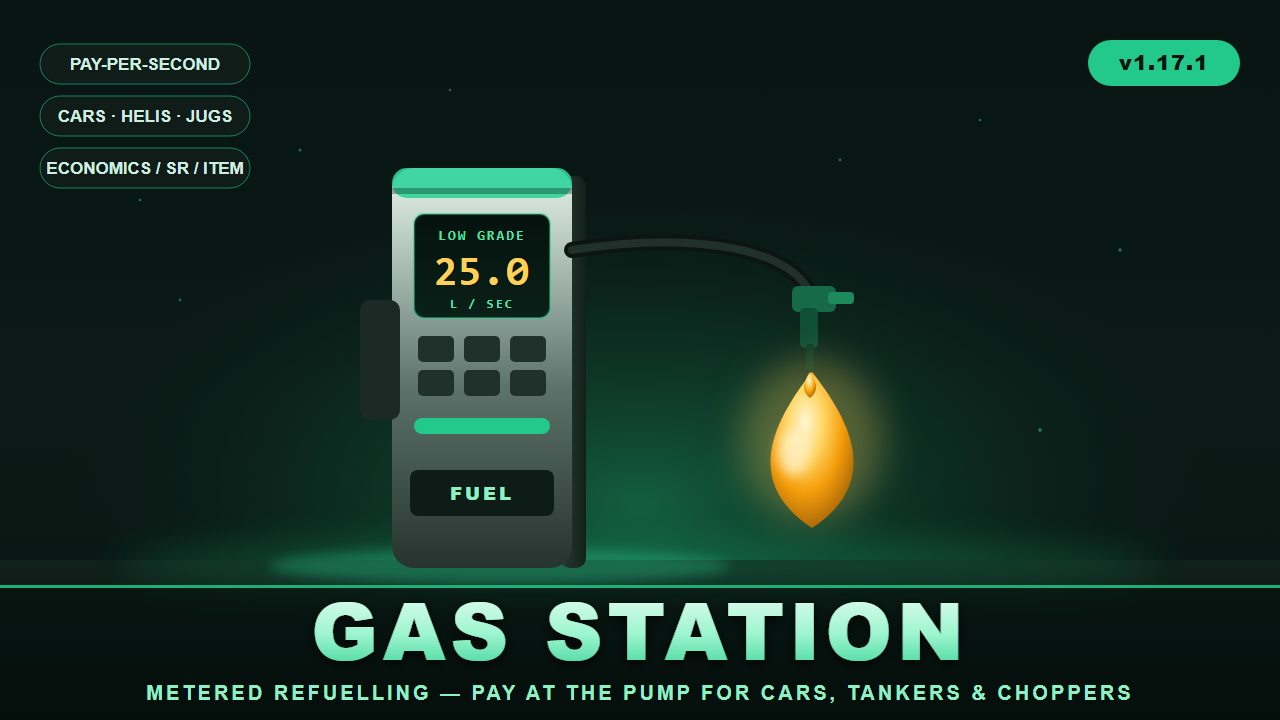
⛽ GasStation Working fuel pumps at every gas station monument. GasStation turns the pumps at Rust's gas station monuments into real, metered refuelling points. Players pull up in a modular car, hop on a bike, land a minicopter, or even walk up with a jug — press one button, pick their fuel, and pay by the second while the pump fills the tank in real time. When the tank's full or the wallet runs dry, it stops on its own and refunds anything it couldn't deliver. Pumps are found automatically — the plugin locates gas station monuments and auto-detects their pump props, so it works out of the box on wiped maps and custom maps alike, with a full admin toolkit to fine-tune positions when you want to. ✨ Features ⏱️ Metered, pay-per-second billing — players are charged live as fuel flows, with unused charges refunded if the tank fills mid-pump 🚗 Wide vehicle support — modular cars (fuel tank and tanker fuel-tank modules), plus minicopters, attack helis, scrap transport helis, motorbikes, sidecars, and snowmobiles (all configurable) 🧴 On-foot jug refuelling — fill water jugs, bota bags, and buckets with water, crude, or low grade fuel without a vehicle at all ⛽ Fully configurable fuel types — Low Grade, Crude Oil, Water, and jug variants out of the box; set delivery rate, price, max run-time, target tank, colour, and per-fuel permission for each 💰 Three currency modes — Economics, ServerRewards points, or any item (scrap by default); currency can even be overridden per fuel 🏷️ Permission discounts — e.g. gasstation.vip = 25% off (add as many tiers as you like), plus free-fuel permission and optional free-for-admins 🖥️ Clean in-game UI — a pump prompt, fuel-selection menu, and a live progress bar showing units delivered and money spent; press again to stop 🎯 Auto pump detection — finds gas station monuments (MonumentFinder supported, terrain fallback) and their pump props automatically, rebuilding on wipe 🛠️ Full admin toolset — scan, auto-add, manually place/remove pumps, list, visualize, teleport between stations, and inspect vehicles 🎛️ Tunable behaviour — detection radius, facing requirement, activation button (SPACE / E / R / SHIFT / CTRL), remount handling, lock-while-filling, stop-on-leave, and more ⌨️ Player experience Drive/walk up to a station pump → a "FUEL PUMP — press [SPACE]" prompt appears Press the button → the fuel menu opens with prices and your balance Pick a fuel → the pump fills your tank while a progress bar tracks units and cost Press again (or fill up / run out) → it stops and reports what you got 🛠️ Admin commands (/gasstation) near, stations, tp <n>, scan [filter], autoadd [filter], add, remove, list, show, wipe, modules, reload — everything you need to set up and debug pumps on any map. 🔐 Permissions gasstation.use — use the pumps gasstation.admin — setup/admin commands gasstation.free — refuel for free gasstation.vip (and any discount tiers you add) — percentage discounts Optional per-fuel permissions 🧩 Dependencies (all optional) Economics and/or ServerRewards — for currency (item mode needs neither) MonumentFinder — recommended for reliable monument/pump detection ImageLibrary — only if you want a custom prompt image Version 1.17.1 · by carl

£7.99 · v1.17.1
RUST PLUGIN

Electric Furnace

ElectricFurnace turns a vanilla large furnace into an Electric Furnace that runs on electricity instead of wood. Going electric spawns a real IO node (Electrical Branch) on the furnace, wire any power source into its input and unused power passes straight through the output. If power ever stops reaching it, the furnace falls back to burning wood until power is restored. Get one by upgrading an existing furnace with a hammer, or via an admin-only command that places one wherever you're looking, and it all survives server restarts. Permissions electricfurnace.use lets you hit with a hammer to upgrade a normal furnace. electricfurnace.craft lets you use /efcraft. ADMIN USE ONLY, places the furnace wherever you're looking, do not give this to regular players. electricfurnace.admin bypasses cost/limits with config, unlocks /efmove and /effix Getting one /efcraft — pays the configured cost and places an Electric Furnace in front of you, wherever you're currently looking. ADMIN USE ONLY! Use hammer hit a normal Large furnace the configured number of times (default 5) to upgrade it in place. Limits Default is 5 Electric Furnaces per player, but it's configurable. Once a player hits the limit, a chat message lets them know and placing/upgrading stops until they're under it again. Cost Fully configurable, supports 5 payment methods that can be mixed and matched: ServerRewards, Economics, Scrap, a custom item, or a set of raw resources. Chat Commands (admin) /efcraft Admin only. Crafts and places an Electric Furnace wherever you're looking, for the configured cost. /efmove <x> <y> <z> Admin only. Look at an Electric Furnace to reposition its IO node, the new offset is saved as the default going forward. /effix [rebuild] [orphans] Admin only. Re-attaches or fully rebuilds IO nodes on all tracked furnaces, and can optionally clean up leftover orphan nodes.

£7.49 · v1.0.0

RUST PLUGIN

Electric Refinery

ElectricRefinery turns a vanilla small oil refinery into an Electric Refinery that runs on electricity instead of wood. Going electric spawns a real IO node (Electrical Branch) on the refinery, wire any power source into its input and unused power passes straight through the output. If power ever stops reaching it, the refinery falls back to burning wood until power is restored. Get one by upgrading an existing refinery with a hammer, or via an admin-only command that places one wherever you're looking, and it all survives server restarts. Permissions electricrefinery.use lets you hit with a hammer to upgrade a normal refinery. electricrefinery.craft lets you use. /ercraft. ADMIN USE ONLY, places the refinery wherever you're looking, do not give this to regular players. electricrefinery.admin bypasses cost/limits with config, unlocks /ermove and /erfix Getting one /ercraft — pays the configured cost and places an Electric Refinery in front of you, wherever you're currently looking. ADMIN USE ONLY! Hammer hit a normal refinery the configured number of times (default 5) to upgrade it in place. Limits Default is 5 Electric Refineries per player, but it's configurable. Once a player hits the limit, a chat message lets them know and placing/upgrading stops until they're under it again. Cost Fully configurable, supports 5 payment methods that can be mixed and matched: ServerRewards, Economics, Scrap, a custom item, or a set of raw resources. Chat Commands admin /ercraft Admin only. Crafts and places an Electric Refinery wherever you're looking, for the configured cost. /ermove <x> <y> <z> [yaw] Admin only. Look at an Electric Refinery to reposition its IO node, the new offset is saved as the default going forward. /erfix [rebuild] [orphans] Admin only. Re-attaches or fully rebuilds IO nodes on all tracked refineries, and can optionally clean up leftover orphan nodes.

£7.49 · v1.0.0